
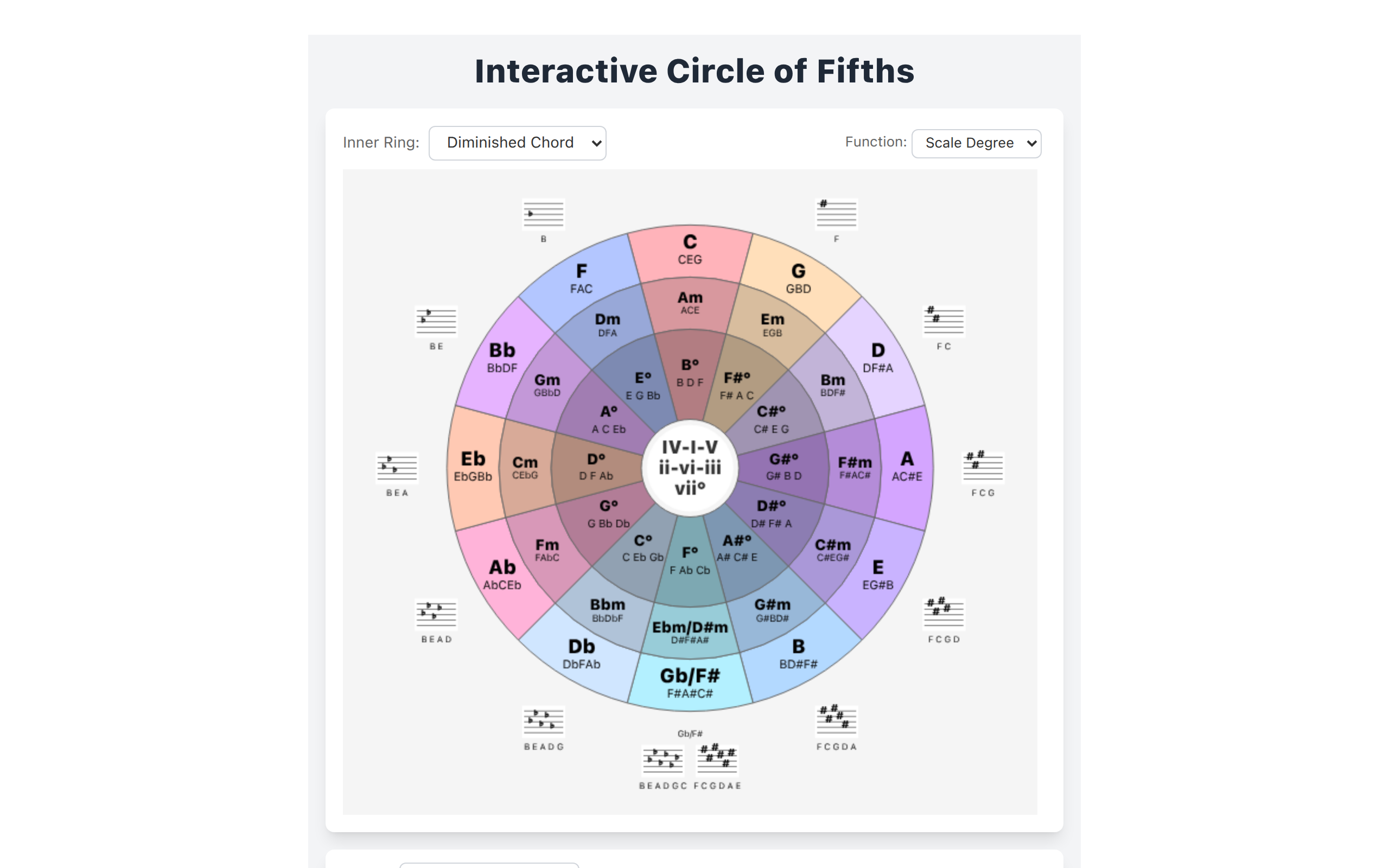
Interactive Circle of Fifths
Explore the Interactive Circle of Fifths.
About
Explore the Interactive Circle of Fifths. See and hear the relationships between chords in any key. Learn fingerings from piano and guitar visualizers. Study major, minor, and diminished chords, pentatonic, blues, diatonic, and harmonized scales.
Key Features
Interactive Circle Display
A dynamic circle of fifths visualization that highlights relationships between keys, relative minors, and common chord progressions.
Audio Playback of Chords & Scales
Hear major, minor, diminished chords and a variety of scales (pentatonic, blues, diatonic, harmonized) for any selected key.
Instrument Fingerings Visualizer
Piano and guitar visualizers that show finger placements and voicings for selected chords and scale notes.
Custom Key & Scale Selection
Choose any root/key and scale type to explore harmonization, chord functions, and playable voicings tailored to that selection.
How to Use Interactive Circle of Fifths
1) Open the app and select a root key or click a key on the circle of fifths. 2) Use the controls to choose a scale or chord type (major, minor, diminished, pentatonic, blues, etc.). 3) Click any chord or scale degree to hear playback and view piano/guitar fingerings. 4) Toggle instruments and iterate on progressions to study relationships, transpose, or practice fingerings.